Your travel gadgets go everywhere with you—airports, hotels, cafes, and crowded streets. But have you ever stopped to think about what’s lurking on their surfaces?
Germs and bacteria can easily hitch a ride on your phone, headphones, or tablet, putting your health at risk. If you want to keep yourself safe and your gadgets working perfectly, knowing how to sanitize them properly is a must.
You’ll discover simple, effective steps to clean your travel gear without causing damage. Keep reading, and learn how to protect yourself and your devices every time you hit the road.
Importance Of Sanitizing Travel Gadgets
Sanitizing travel gadgets is crucial for staying healthy on the go. These devices go everywhere with us. Airports, hotels, taxis, and restaurants. Germs easily collect on their surfaces. Cleaning them regularly reduces the chance of illness. It protects you and those around you. Simple habits keep your gadgets safe and your travels smoother.
Health Risks From Dirty Devices
Dirty travel gadgets can carry harmful bacteria and viruses. Touching these devices spreads germs to your hands and face. This can cause colds, flu, or stomach bugs. Some germs live for hours or days on surfaces. Frequent cleaning lowers infection risks. It also prevents skin irritations and allergies. Keeping gadgets clean supports your immune system during travel.
Common Contaminated Gadgets
Phones, tablets, and laptops are top germ carriers. Headphones and chargers get dirty too. Travel adapters and power banks also collect germs. These devices touch many surfaces and hands daily. Public spaces increase contamination chances. Cleaning all your gadgets ensures fewer germs spread. Use wipes or alcohol-based cleaners safe for electronics. Regular care keeps your travel gear hygienic and reliable.
Safe Cleaning Materials
Choosing safe cleaning materials is key to protect your travel gadgets. Use gentle products that do not damage screens, buttons, or ports. Harsh chemicals can ruin delicate surfaces or leave harmful residues. Clean items carefully to keep them working well and looking new.
Recommended Cleaning Solutions
Use a soft cloth slightly dampened with water for most devices. Alcohol-based wipes with 70% isopropyl alcohol work well to kill germs. Avoid soaking gadgets or using too much liquid. Mild soap mixed with water can clean sturdy cases or accessories. Always check the device’s manual for cleaning advice.
Avoiding Harmful Chemicals
Never use bleach, ammonia, or strong solvents on gadgets. These chemicals can corrode metal parts and damage screens. Avoid abrasive cleaners or rough cloths that cause scratches. Choose products made for electronics or sensitive surfaces. Protect your devices by using safe and tested materials only.
Step-by-step Cleaning Process
Cleaning your travel gadgets is important to keep them safe and working well. Dirt, germs, and dust can build up on devices. This step-by-step cleaning process helps you sanitize each part carefully. Follow these easy steps to clean your gadgets properly before and after travel.
Power Off And Unplug Devices
Always turn off your gadgets before cleaning. Unplug them from chargers or other cables. This prevents damage and keeps you safe. Cleaning devices while on can cause short circuits or other issues.
Remove Cases And Accessories
Take off any covers, cases, or attachments. These parts often collect dirt and germs. Clean them separately using a mild soap and water solution. Dry them completely before putting them back on your device.
Wiping Screens And Surfaces
Use a soft, lint-free cloth to wipe screens. Lightly dampen the cloth with water or a screen-safe cleaner. Avoid spraying liquids directly on the device. Gently wipe all surfaces, including backs and sides, to remove fingerprints and dust.
Cleaning Ports And Buttons
Use a dry, soft brush or a clean, dry cotton swab. Remove dust and debris from charging ports and buttons. Avoid using liquids inside ports to prevent damage. Clean carefully to keep gadgets working smoothly.
Sanitizing Specific Gadgets
Travel gadgets carry many germs. Dirt and bacteria hide in buttons and screens. Cleaning each device properly protects your health. Different gadgets need different care. Use the right method to avoid damage. Let’s explore how to sanitize common travel gadgets safely and effectively.
Smartphones And Tablets
Turn off the device before cleaning. Use a soft cloth dampened with 70% isopropyl alcohol. Gently wipe the screen and case. Avoid excess liquid to prevent damage. Do not spray cleaner directly on the device. Clean buttons and edges carefully. Let the device air dry fully before use.
Laptops And Keyboards
Shut down the laptop first. Use a microfiber cloth with a small amount of alcohol-based cleaner. Wipe the keyboard, screen, and outer surfaces. For keyboards, use compressed air to remove dust. Avoid soaking the cloth or using harsh chemicals. Allow the laptop to dry completely before turning it on.
Headphones And Earbuds
Remove ear tips if possible. Wash silicone tips with warm soapy water and dry well. Wipe the earbuds and headband with an alcohol wipe. Clean speaker mesh gently with a dry brush. Never submerge headphones in water. Let all parts dry before reassembling and using.
Portable Chargers And Power Banks
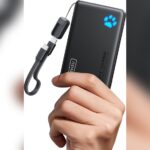
Use a dry microfiber cloth to clean the surface. If needed, slightly dampen the cloth with alcohol solution. Wipe ports and edges carefully without allowing moisture inside. Do not use sprays or liquids directly on the device. Keep chargers dry and clean to maintain performance and safety.
Tips For Maintaining Gadget Hygiene
Keeping your travel gadgets clean helps protect your health and extends their life. Dirt and germs collect quickly on devices like phones, tablets, and headphones. Simple habits can keep your gadgets safe and fresh during every trip.
Regular Cleaning Schedule
Set a routine to clean your gadgets often. Wipe screens and surfaces with a soft cloth and gentle cleaner. Avoid harsh chemicals that can damage devices. Cleaning after each trip reduces germs and dust buildup.
Using Protective Covers
Use cases and covers to shield your gadgets from dirt and scratches. Choose covers that are easy to clean. Silicone or plastic covers can be wiped down quickly. Covers help keep your devices hygienic and safe.
Safe Storage Practices
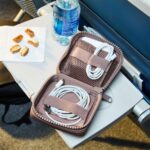
Store gadgets in clean, dry places when not in use. Use separate pouches or compartments in your bag. Avoid placing devices directly on dirty surfaces. Proper storage lowers the risk of contamination and damage.

Credit: www.washingtonpost.com
Travel-friendly Sanitizing Tools
Keeping travel gadgets clean is key for safe trips. Choosing the right tools helps sanitize devices fast and easy. Compact, effective, and easy to carry—these tools make travel hygiene simple.
Portable Uv Sanitizers
Portable UV sanitizers use ultraviolet light to kill germs. They are small and fit in bags or pockets. Just place your gadget inside and turn it on. UV light reaches tough spots that wipes might miss. It works on phones, earbuds, and other small devices. No liquids needed, so no risk of damage.
Travel-sized Cleaning Kits
Travel-sized cleaning kits include small brushes, cloths, and sprays. These kits clean screens, keyboards, and ports well. Easy to pack and carry in any bag. The brushes reach narrow spaces where dirt hides. Soft cloths keep screens clear without scratches. Sprays often use safe formulas for electronics.
Antibacterial Wipes And Sprays
Antibacterial wipes and sprays kill germs quickly on gadgets. Choose wipes made for electronics to avoid damage. Sprays should be applied to cloths, not directly on devices. They help remove oils and bacteria from surfaces. Lightweight and disposable, perfect for travel use. Use them after touching public surfaces or before use.

Credit: www.amazon.com
Frequently Asked Questions
How Often Should I Sanitize My Travel Gadgets?
Sanitize travel gadgets after every trip or daily use in public places. This helps reduce germs and keeps devices safe to handle.
What Are The Safest Ways To Clean Electronic Travel Gadgets?
Use alcohol wipes or cloth dampened with 70% isopropyl alcohol. Avoid liquids that can damage screens or internal parts.
Can Sanitizing Damage My Travel Gadgets?
Proper sanitizing with soft cloth and alcohol is safe for most devices. Avoid soaking or spraying directly to prevent damage.
Conclusion
Sanitizing travel gadgets keeps you safe and healthy. Clean devices before and after every trip. Use gentle wipes or cloths with safe solutions. Avoid harsh chemicals that can damage your gadgets. Pay attention to screens, buttons, and chargers. Regular cleaning helps stop germs from spreading.
Small efforts protect your health on the go. Stay mindful and keep your gadgets fresh. Safe travel starts with clean, sanitized gear. Simple steps make a big difference every time.