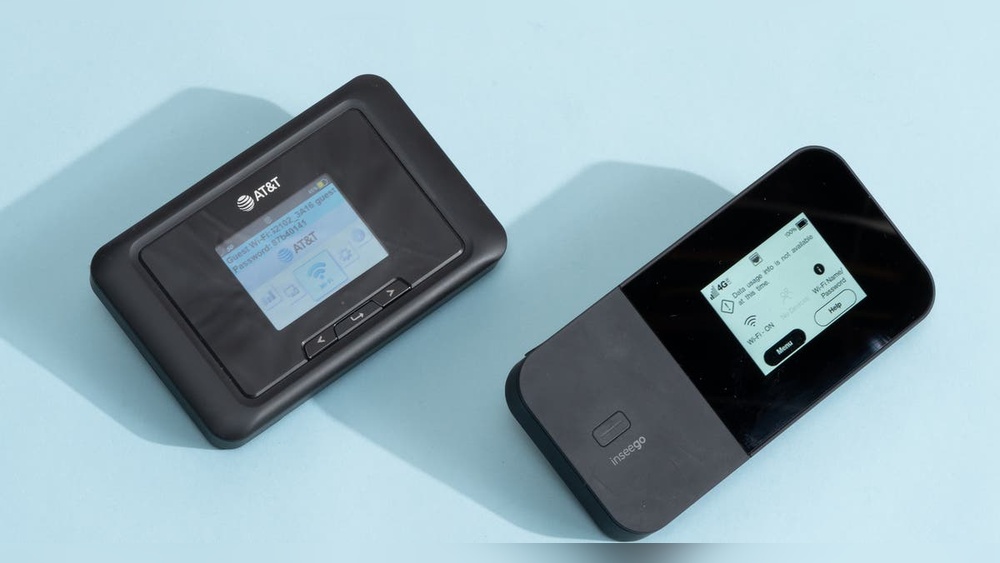
Have you ever found yourself stuck without internet when you needed it the most? Imagine having a small device that fits in your pocket and gives you Wi-Fi wherever you go.
Sounds handy, right? Portable Wi-Fi hotspots promise just that – constant, reliable internet on the move. But are they really as useful as they seem? You’ll discover how these gadgets can change the way you stay connected and whether they’re worth adding to your tech collection.
Keep reading to find out if a portable Wi-Fi hotspot is the game-changer you’ve been looking for.
Benefits Of Portable Wi-fi Hotspots
Portable Wi-Fi hotspots offer many benefits for those needing internet on the go. These small devices provide easy access to the internet without relying on public Wi-Fi networks. They are ideal for travelers, remote workers, and anyone who needs reliable internet outside their home or office.
Convenient Internet Access Anywhere
Portable Wi-Fi hotspots connect to cellular networks, allowing internet access almost anywhere. They work in places without fixed internet, like parks or cafes. No need to search for open Wi-Fi spots or worry about security risks from public networks. Just turn on the device and connect instantly.
Multiple Device Connectivity
One portable hotspot can connect several devices at once. Smartphones, laptops, tablets, and other gadgets share the same internet connection. This saves battery life on phones and avoids using mobile data plans. Sharing internet with friends or colleagues becomes easy and fast.
Cost-effective Data Usage
Using a portable hotspot helps control data costs. It often offers better data plans than phone carriers. You can choose plans based on your usage, avoiding expensive overage fees. Also, it prevents accidental data use on phones, saving money on monthly bills.
How Portable Hotspots Work
Portable Wi-Fi hotspots provide internet access by connecting to cellular networks. They work like small routers that share internet with multiple devices. Understanding how these devices work helps to see their benefits and limitations.
Sim Card And Cellular Network
A portable hotspot uses a SIM card to connect to a mobile network. The SIM card links the device to a cellular provider. This connection allows the hotspot to get internet from 3G, 4G, or 5G networks. The speed and coverage depend on the network quality. Good coverage means faster and more reliable internet access.
Device Setup And Configuration
Setting up a portable hotspot is simple. Insert the SIM card into the device. Turn it on and wait for it to connect to the network. You can configure settings through a web page or an app. This setup lets you change the Wi-Fi name and password. It also helps to manage data usage and connected devices.
Battery Life And Power Options
Portable hotspots run on rechargeable batteries. Battery life varies but usually lasts several hours. Some models support power-saving modes to extend usage time. You can recharge the device using USB cables or power banks. This makes them easy to use anywhere without needing a power outlet.
Comparing Portable Hotspots And Mobile Data
Choosing between portable Wi-Fi hotspots and mobile data can be tricky. Both offer ways to stay online on the go. Each option has its own strengths and limits. Understanding these can help you make the right choice for your needs.
Speed And Reliability
Portable hotspots often provide faster internet speeds. They use strong signals from multiple networks. Mobile data speed depends on your phone’s signal. Crowded areas can slow down mobile data. Hotspots may keep a more stable connection.
Data Limits And Plans
Mobile data plans usually include monthly limits. Exceeding these can lead to extra charges. Portable hotspots often come with special data packages. These packages may offer more data for sharing. Choose a plan that fits your internet use.
Security Considerations
Portable hotspots create a private network. This reduces the risk of hacking in public places. Mobile data is also secure but shares the phone’s network. Public Wi-Fi without a hotspot can be risky. Using a hotspot adds an extra layer of safety.

Credit: www.nytimes.com
Best Use Cases For Portable Hotspots
Portable Wi-Fi hotspots provide internet access anywhere with cellular coverage. They are small devices that create a private Wi-Fi network. This makes them useful in many situations. Understanding the best use cases helps you see their real value.
Traveling And Remote Work
Travelers can stay connected without relying on public Wi-Fi. Portable hotspots offer secure internet for laptops and phones. Remote workers can join meetings and send emails from any location. These devices ensure steady internet on trains, planes, or hotels. No need to search for cafes or airports to get online.
Emergency Connectivity
Power outages or natural disasters can cut off home internet. Portable hotspots provide backup internet in emergencies. They help people contact family, emergency services, or work remotely. First responders also use hotspots to maintain communication in disaster zones. This can be a lifeline during urgent situations.
Events And Outdoor Activities
Outdoor events often lack Wi-Fi infrastructure. Portable hotspots allow vendors and attendees to connect easily. They support ticket scanning, payments, and social sharing. Campers and hikers can check maps, weather, and stay in touch. These hotspots keep you online far from city networks.
Choosing The Right Portable Hotspot
Choosing the right portable hotspot makes a big difference in your internet experience. It affects speed, battery life, and how many devices you can connect. Finding the best fit means knowing what features matter most. Also, understanding brands and prices helps you pick a good option without overspending. Here is a guide to help you decide.
Key Features To Look For
Start with battery life. Longer battery means more hours without charging. Check the device’s speed. Faster speeds help with streaming and video calls. See how many devices the hotspot can support. More connections help if you share internet with others. Look for easy setup and good signal range. These features make the device simple and reliable to use.
Top Brands And Models
Some brands are known for making solid portable hotspots. Look at brands like Netgear, Huawei, and TP-Link. They have models that fit different needs and budgets. Netgear Nighthawk offers fast speeds and strong battery life. Huawei E5577 is compact and budget-friendly. TP-Link M7350 balances speed and price well. Choose a brand with good reviews and customer support.
Price Vs Performance
Think about how much you want to spend. High price does not always mean best performance. Some affordable models offer good speed and battery life. Expensive devices may have more features but may not be necessary. Decide what features are important to you. Then find a hotspot that meets those needs at a fair price. This helps avoid paying for extras you don’t need.

Credit: www.amazon.com
Tips For Maximizing Hotspot Performance
Portable Wi-Fi hotspots offer great convenience, especially on the move. To enjoy smooth internet access, you must get the best from your device. Simple tips can help you boost performance and avoid common issues.
Optimizing Signal Strength
Place your hotspot near a window or open space. Avoid walls and metal objects that block signals. Keep the device away from other electronics to reduce interference. Elevate the hotspot if possible for a clearer signal. Check the signal bars often and move the device if the signal is weak.
Managing Data Usage
Set limits on your data to avoid extra charges. Close apps and tabs that use the internet without your knowledge. Use data-saving modes on your devices to reduce usage. Download files before leaving Wi-Fi zones. Monitor your data through the hotspot app or website regularly.
Extending Battery Life
Turn off the hotspot when not in use. Lower the screen brightness of the device. Use power-saving mode if available. Carry a portable charger for longer trips. Avoid charging and using the hotspot at the same time to prevent overheating.
:max_bytes(150000):strip_icc()/tal-netgear-nighthawk-m1-4g-lte-wifi-mobile-hotspot-peter-weckend-6-fb71473026794238a59fd9988ffab5c8.jpeg)
Credit: www.travelandleisure.com
Frequently Asked Questions
What Is A Portable Wi-fi Hotspot?
A portable Wi-Fi hotspot is a small device that shares internet via cellular networks. It lets multiple devices connect wirelessly.
How Does A Portable Hotspot Work?
It uses a SIM card to access mobile data and creates a Wi-Fi signal for other devices to join.
Can I Use A Portable Hotspot Abroad?
Yes, with the right data plan or local SIM card, you can use it internationally to stay connected.
Are Portable Wi-fi Hotspots Secure To Use?
They offer better security than public Wi-Fi because you control who connects to your private network.
Conclusion
Portable Wi-Fi hotspots offer clear benefits for travel and daily use. They provide easy internet access wherever you go. No need to rely on public Wi-Fi or find a café. These devices keep multiple gadgets connected at once. Battery life and data limits can vary, so choose wisely.
For many, the convenience outweighs the cost. Stay connected, work, or stream without interruption. A simple tool that helps keep you online anytime. Consider your needs, then decide if it fits your lifestyle. Portable hotspots often bring freedom and flexibility to internet use.