You rely on your portable projector and camera to capture moments and share stories. But dirt, dust, and fingerprints can quickly ruin the quality of your images and videos.
Knowing how to clean your devices properly not only keeps them looking great but also ensures they work perfectly every time you use them. In this guide, you’ll discover simple, effective ways to clean your portable projectors and cameras without causing damage.
Keep reading to protect your gear and enjoy clearer, sharper visuals every time.

Credit: www.amazon.com
Choosing Cleaning Tools
Choosing the right tools is key to clean portable projectors and cameras safely. Using the wrong items can scratch lenses or damage sensitive parts. Select gentle, effective cleaning tools that protect your devices. Proper tools help remove dust, dirt, and smudges without harm.
Soft Cloths And Brushes
Soft cloths are essential for cleaning lenses and screens. Microfiber cloths work best because they do not scratch surfaces. Avoid rough fabrics like paper towels or tissues. Small, soft brushes help remove dust from hard-to-reach areas. Use gentle strokes to prevent damage to delicate parts.
Lens Cleaning Solutions
Lens cleaning solutions remove fingerprints and oils effectively. Choose solutions made specifically for camera and projector lenses. Never use household cleaners or alcohol, as they can damage coatings. Apply a small amount to the cloth, not directly on the lens. Clean in a circular motion for best results.
Compressed Air Options
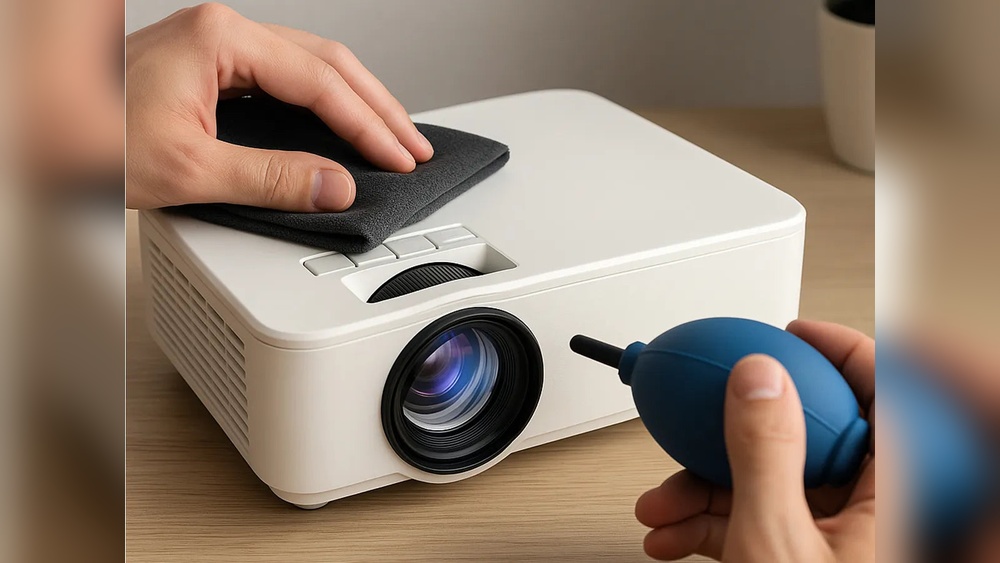
Compressed air helps blow away dust without touching the lens. Use canned air with a nozzle designed for electronics. Hold the can upright and spray short bursts to avoid moisture. Avoid blowing with your mouth, which can add saliva and dirt. This tool is great for cleaning vents and tight spaces.
Credit: clean-garage.com
Preparing Devices For Cleaning
Preparing your portable projector and camera before cleaning is important. It keeps the devices safe and helps you clean better. Taking simple steps ensures no damage happens during cleaning. Follow these easy steps to get started.
Powering Off And Unplugging
Turn off your device completely. Do not clean while it is on. Unplug the device from any power source. This stops electric shocks or short circuits. Wait a few minutes after turning off. This lets the device cool down before cleaning.
Removing Batteries And Cables
Take out the batteries carefully. This avoids accidental power-on during cleaning. Remove all cables connected to the device. Loose cables can get damaged or cause accidents. Keep the batteries and cables in a safe place. This keeps everything organized and ready for use later.
Cleaning Projector Lenses
Cleaning the lenses of portable projectors is key to clear images. Dirt and smudges block light and reduce picture quality. Regular lens care keeps your device working well. It also extends the life of the projector. Simple steps can make a big difference in lens cleanliness.
Removing Dust And Smudges
Start by blowing off loose dust with a soft air blower. Avoid using your breath; it adds moisture. Use a microfiber cloth designed for lenses to wipe gently. Move the cloth in a circular motion to lift smudges. For stubborn marks, dampen the cloth lightly with lens cleaner. Never spray liquid directly on the lens surface. This method cleans the lens without damage or streaks.
Avoiding Scratches
Use only soft, lint-free cloths for cleaning. Avoid paper towels or rough fabrics that scratch lenses. Do not press hard on the lens when wiping. Store the projector with its lens cap on to protect it. Keep the lens away from sharp objects and dust. Regular gentle cleaning prevents scratches and keeps images sharp.
Cleaning Camera Lenses
Cleaning camera lenses is key to getting clear, sharp photos and videos. Dust, fingerprints, and smudges can reduce image quality. Regular cleaning keeps your lens in top shape. It also protects the lens coating from damage.
Use gentle tools and products made for camera lenses. Avoid harsh chemicals or rough cloths. These can scratch or damage the glass. Handle the lens carefully to prevent dust from settling again.
Using Lens Pens
Lens pens are handy tools for cleaning camera lenses. They have a soft brush on one end. Use it to remove loose dust and dirt. The other end has a special cleaning tip. It gently removes smudges and fingerprints.
Start by brushing the lens with the soft brush. Next, use the cleaning tip in small, circular motions. This removes oils and marks without scratching. Lens pens are easy to carry and safe for lenses.
Dealing With Stubborn Marks
Some marks need more care to clean off. Use a microfiber cloth made for lenses. Lightly dampen it with lens cleaning solution or distilled water. Avoid using tap water or household cleaners.
Gently wipe the lens in a circular motion. Do not press hard to avoid damage. Repeat if needed, using a clean part of the cloth each time. Let the lens air dry before use.
Cleaning Device Bodies
Keeping portable projectors and cameras clean helps them work well. Dirt and dust can harm their parts. Cleaning the device body is important. It keeps the device looking good. Also, it stops dust from getting inside. Use gentle methods to avoid damage.
Clean the outside regularly. Use soft cloths and mild cleaners. Avoid harsh chemicals and rough materials. These can scratch or break the surface. Handle the device carefully during cleaning.
Wiping Exterior Surfaces
Start with a dry, soft cloth. Wipe the whole outside gently. Remove dust, fingerprints, and smudges. For tough spots, slightly dampen the cloth. Use water or a mild soap solution. Never spray liquid directly on the device. Wipe in small, circular motions. Avoid pressing too hard.
Use microfiber cloths for best results. They trap dust without scratching. Clean regularly to prevent buildup. This keeps the device fresh and clean.
Cleaning Buttons And Ports
Buttons and ports collect dirt easily. Use a soft brush or cotton swab. Gently clean around buttons and inside ports. Avoid pushing dirt deeper inside. Use compressed air to blow out dust. Keep moisture away from openings. Dry cloths help remove leftover dirt. Clean these parts carefully to keep function smooth.
Maintaining Internal Components
Maintaining the internal parts of portable projectors and cameras is key to their long life and good performance. Dust and dirt can harm the inside parts and cause overheating. Regular care keeps these devices working well and prevents costly repairs.
Cleaning Air Vents
Air vents let heat escape from inside the device. Dust can block these vents and cause the device to get too hot. Use a soft brush or a small vacuum to remove dust from the vents. Avoid using water or wet cloths. Clean vents help the device stay cool and safe.
Handling Internal Dust
Dust inside the device can harm lenses and sensors. Open the device carefully if the user manual allows. Use a can of compressed air to blow dust away. Do not touch internal parts with your fingers. Keep the device in a clean place to reduce dust build-up.
Storage Tips To Prevent Dirt
Keeping portable projectors and cameras clean starts with proper storage. Dirt and dust can damage lenses and affect performance. Protecting your devices when not in use helps them last longer. Simple storage habits prevent grime buildup and keep gear ready for use.
Using Protective Cases
Always store projectors and cameras in protective cases. Cases shield devices from dust, dirt, and accidental knocks. Choose cases with soft, padded interiors to avoid scratches. Hard-shell cases offer extra protection during travel. Clean cases regularly to stop dirt from transferring to your gear.
Environmental Considerations
Keep devices away from dusty or humid areas. Avoid storing gear in direct sunlight or near heat sources. Extreme temperatures can harm electronics and lenses. Use silica gel packs inside cases to absorb moisture. Store devices in cool, dry places to prevent mold and corrosion.
Safety Precautions
Cleaning portable projectors and cameras requires care. Safety precautions protect your device and yourself. Following simple rules keeps your equipment safe and working well.
Avoiding Liquid Damage
Never spray water or cleaning fluid directly on the device. Use a soft, damp cloth instead. Avoid excess moisture near openings or lenses. Liquids can damage internal parts quickly. Always unplug the device before cleaning. Use special electronic-safe cleaning solutions. Let the device dry completely before turning it on again.
Handling Fragile Parts
Projectors and cameras have delicate lenses and screens. Clean these parts gently with a microfiber cloth. Do not press hard or use rough materials. Avoid touching lenses with your fingers. Handle the device with care to prevent drops. Remove batteries if you clean inside battery compartments. Store your device safely after cleaning to avoid damage.
Credit: www.ebay.com
Frequently Asked Questions
How Often Should I Clean My Portable Projector And Camera?
Cleaning your devices monthly keeps them working well. Dust and dirt can harm the lens and parts. Regular cleaning helps avoid blurry images and errors.
What Is The Safest Way To Clean Projector Lenses?
Use a soft microfiber cloth to gently wipe the lens. Avoid harsh chemicals or paper towels that can scratch it. A little lens cleaner made for cameras works best.
Can I Use Household Cleaners On Portable Projectors And Cameras?
No, household cleaners can damage sensitive parts and lenses. Use only products designed for electronics or camera lenses. Water or alcohol-based cleaners can cause harm and leave residue.
Conclusion
Cleaning portable projectors and cameras keeps them working well. Use soft cloths and gentle cleaning solutions. Avoid harsh chemicals that can damage lenses and screens. Regular cleaning prevents dust buildup and blurry images. Always handle devices with care during cleaning.
A clean device means clearer pictures and longer life. Keep your gear ready for every use. Small steps make a big difference. Stay consistent, and your devices will stay in top shape.