Imagine capturing breathtaking moments on your trip, only to lose them because of a lost camera or a damaged phone. It’s a nightmare you don’t want to face.
But what if there was a simple way to make sure your photos are always safe, no matter where you are? You’ll discover easy and effective methods to back up your photos while traveling. By the time you finish reading, you’ll feel confident that your memories are protected, letting you focus on enjoying every moment.
Ready to learn how to keep your photos secure on the go? Let’s dive in.

Credit: www.diyphotography.net
Why Backup Photos On The Go
Travel photos capture special moments and memories. Losing them can be heartbreaking. Backing up photos while traveling keeps these memories safe. It helps avoid stress and disappointment. Keeping backups is simple and smart. It protects your pictures from unexpected problems.
Risks Of Losing Travel Photos
Travel photos can be lost in many ways. Devices can get stolen or damaged. Memory cards may fail without warning. Apps or software can accidentally delete files. Weather and accidents can cause data loss. Without backups, photos are gone forever. Losing photos means losing precious memories.
Benefits Of Regular Backups
Backing up photos often keeps your memories safe. It gives peace of mind during your trip. You can free up device space by deleting old photos. Backups let you share photos quickly with friends and family. It also helps organize photos better. Regular backups prevent loss from unexpected events.

Credit: www.omnicharge.co
Choosing The Right Backup Method
Choosing the right backup method protects your photos during travel. Different methods suit different needs. Some travelers prefer online backup. Others like physical storage options. Pick a method that fits your trip style and gear. Think about internet access, storage space, and device compatibility.
Cloud Storage Options
Cloud storage lets you save photos online. This means you can access them anywhere. Services like Google Photos and Dropbox offer automatic backups. Upload photos when you find Wi-Fi. Cloud storage protects photos from device loss or damage. Watch out for slow internet, which can delay uploads. Free plans often have limited space. Paid plans provide more room for large photo collections.
External Hard Drives And Ssds
External hard drives and SSDs offer large storage space. They are fast and reliable for backups. Carry one in your travel bag for easy access. SSDs are more durable and lighter than hard drives. Both work without internet connection. Connect them to laptops or compatible devices. Make sure your device supports the drive type. Regularly back up photos to avoid data loss.
Using Memory Cards As Backup
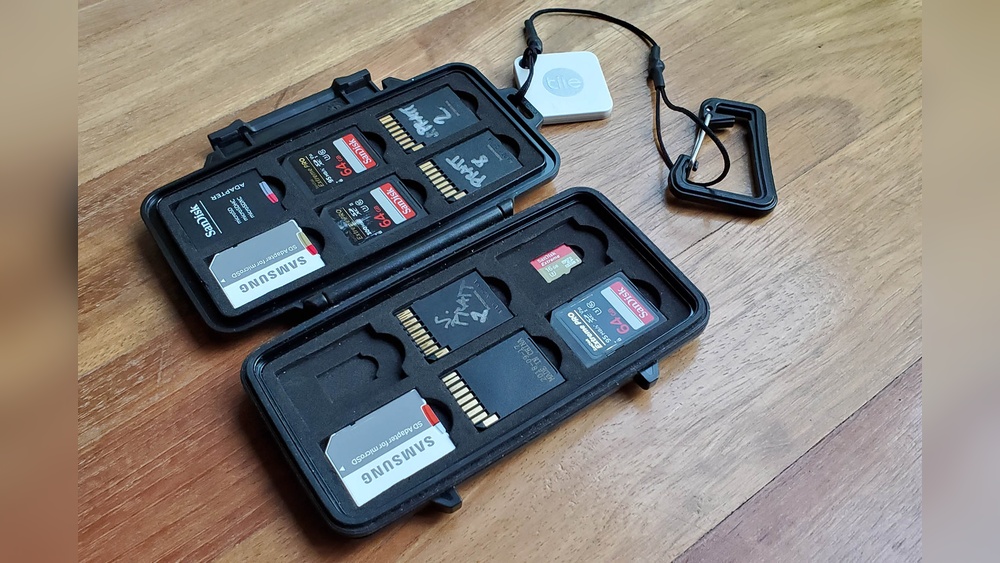
Memory cards can act as extra backup storage. Carry multiple cards during your trip. Swap full cards with empty ones to save photos. Some cameras support dual card slots for automatic backup. Store used cards safely to prevent damage. Memory cards are small and easy to carry. They do not need internet or power. Check card speed and capacity before travel.
Setting Up Cloud Backups
Backing up photos while traveling keeps memories safe from loss or damage. Cloud backups offer a handy and secure way to store your pictures online. Setting up cloud backups before your trip saves time and worry during your journey.
With cloud storage, photos upload automatically. This means you do not have to remember to save each image manually. Access your photos anytime and from any device with an internet connection.
Popular Cloud Services For Photos
Several cloud services specialize in photo storage. Google Photos offers free and paid plans with easy sharing options. Apple iCloud integrates well with iPhones and iPads. Amazon Photos gives unlimited photo storage for Prime members. Microsoft OneDrive works across devices and includes photo backup features.
Automatic Upload Features
Automatic upload saves photos as soon as you connect to Wi-Fi. This feature runs in the background without interrupting your activities. It helps reduce the risk of forgetting to backup important pictures. Check app settings to enable automatic uploads before your trip.
Managing Storage Limits
Cloud services often have free storage limits. Monitor your space to avoid upload failures. Delete unwanted images or transfer photos to other devices to free up space. Consider upgrading to paid plans for more storage during long trips.
Offline Backup Techniques
Backing up photos while traveling is crucial to avoid losing memories. Offline backup techniques help protect photos without needing internet access. These methods work well in remote areas or places with poor connectivity. They also give you control over your data and privacy.
Portable Backup Devices
Portable backup devices are small and easy to carry. Devices like external hard drives or SSDs store many photos. They connect to your camera or phone using USB or Wi-Fi. These devices save photos instantly after shooting. No need to wait to find a computer or internet.
Laptop Or Tablet Backups
Laptops and tablets serve as reliable backup tools on the road. Transfer photos to your device regularly to keep files safe. Use photo management software to organize and view images easily. Laptops also allow editing and sharing photos offline.
Organizing Files Efficiently
Organizing files helps you find photos quickly later. Create folders by date, location, or event. Rename files with clear names to avoid confusion. Regularly delete duplicates or unwanted shots to save space. Good organization keeps backups neat and useful.
Tips For Secure Photo Backup
Backing up photos while traveling keeps memories safe from loss or theft. Secure backups protect your images from hackers and accidents. Follow simple tips to ensure your photos stay private and accessible.
Encrypting Your Backups
Encryption scrambles data so only you can read it. Use apps or software that encrypt your photo backups. This adds a strong layer of protection against unauthorized access. Even if someone steals your backup, they cannot view your photos without the key.
Using Strong Passwords
Create passwords that are long and mix letters, numbers, and symbols. Avoid easy words like “password” or “1234.” Change passwords regularly. Strong passwords stop others from guessing or hacking your backup accounts.
Avoiding Public Wi-fi Risks
Public Wi-Fi is often unsecured and risky for photo backups. Avoid uploading or syncing photos over open networks. Use a personal hotspot or a virtual private network (VPN) for safer connections. This keeps your data encrypted and hidden from others on the same network.
Backup Workflow While Traveling
Keeping your photos safe while traveling is very important. A good backup workflow helps protect your memories from loss or damage. Organizing your backup process is simple and keeps you stress-free. Follow easy steps every day to secure your photos and enjoy your trip.
Daily Backup Routine
Every day, copy your new photos to a backup device. Use a portable hard drive or a reliable cloud service. Do this before you turn off your camera or phone. This habit avoids losing pictures due to device failure or theft.
Keep your backup device charged and ready. Carry extra cables and adapters. This ensures you can back up anywhere, anytime.
Verifying Backup Integrity
Check that your backups are complete and not corrupted. Open some files from the backup to see if they work. Confirm that file sizes match the originals. This step ensures your photos are safe and usable.
Use software tools that compare files automatically. They make verification faster and easier. Do this regularly to catch any problems early.
Managing Backup Storage Space
Monitor your backup device storage daily. Delete old or unwanted files to free up space. Organize photos in folders by date or location. This method helps find images quickly and keeps storage neat.
Consider using multiple backup options. A combination of cloud and physical storage adds extra security. Always keep some free space for new photos.

Credit: www.youtube.com
Frequently Asked Questions
How Can I Backup Photos Without Internet While Traveling?
Use external hard drives or USB flash drives to store photos safely without needing internet access.
What Are The Best Apps To Backup Photos On The Go?
Google Photos, Dropbox, and iCloud are popular apps that automatically save photos to the cloud.
How Often Should I Backup Travel Photos During A Trip?
Backup photos daily or after taking many pictures to avoid losing important memories.
Is It Safe To Use Public Wi-fi For Photo Backup?
Public Wi-Fi can be risky; use a VPN to protect your photos when backing up online.
Conclusion
Backing up photos while traveling keeps memories safe and easy to find. Use multiple methods like cloud storage and external drives for extra security. Regularly save your pictures to avoid losing them. A small habit can save you from big troubles later.
Protect your photos so you enjoy your trip without worry. Safe backups mean peace of mind wherever you go.